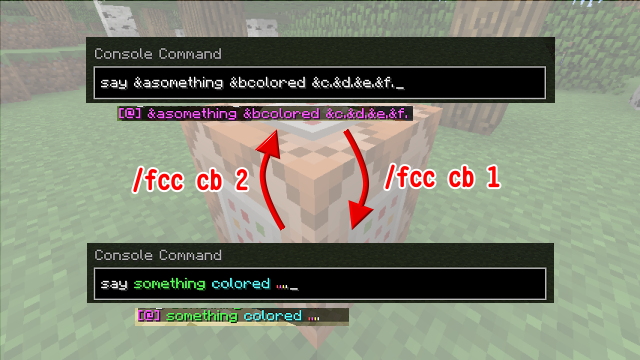
Would you like to use formatting codes in command block ?
You must try this simple plugin.
It's useful for "say" command and some commands with itemmeta in command block.
This plugin can let you convert formatting codes in command block commands between & (ampersand) and § (section symbol) easily.
Just look at a command block, and type a simple command.
| Command | Description | Permission |
| /fcc | Show list of commands | fcc.command |
| /fcc help | Show list of commands | fcc.command |
| /fcc cb | Show command block commands | fcc.command |
| /fcc cb 1 | Convert & (ampersand) to § (section symbol) | fcc.command |
| /fcc cb 2 | Convert § (section symbol) to & (ampersand) | fcc.command |
| /fcc about | About this plugin | fcc.command |
v2.0 (for 1.8)
v1.1 (for 1.7.2)
v1.0 (for 1.7.2)
====================
你想在指令方塊裡面使用格式代碼嗎?
你一定要試試這個簡單的插件
這對於指令方塊內的say指令,或是包含資料標記的指令,是相當有用的
這個插件可以讓你輕鬆轉換指令方塊內的格式代碼,令其在『&』和『§』之間互相轉換
只要盯著指令方塊,然後輸入一個簡單的指令即可。
| 指令 | 描述 | 權限 |
| /fcc | 指令清單 | fcc.command |
| /fcc help | 指令清單 | fcc.command |
| /fcc cb | 查詢指令方塊的指令 | fcc.command |
| /fcc cb 1 | 將指令方塊內的『&』轉換為『§』 | fcc.command |
| /fcc cb 2 | 將指令方塊內的『§』轉換為『&』 | fcc.command |
| /fcc about | 關於此插件 | fcc.command |
v2.0 (for 1.8)
v1.1 (for 1.7.2)
v1.0 (for 1.7.2)
同時也發表於巴哈(superjyhsu(KID))與MCBBS(jyhsu)