Ctrl+F for your trading hall.
Find any villager trade you've seen before, navigate straight to them, and never lose a good librarian again.
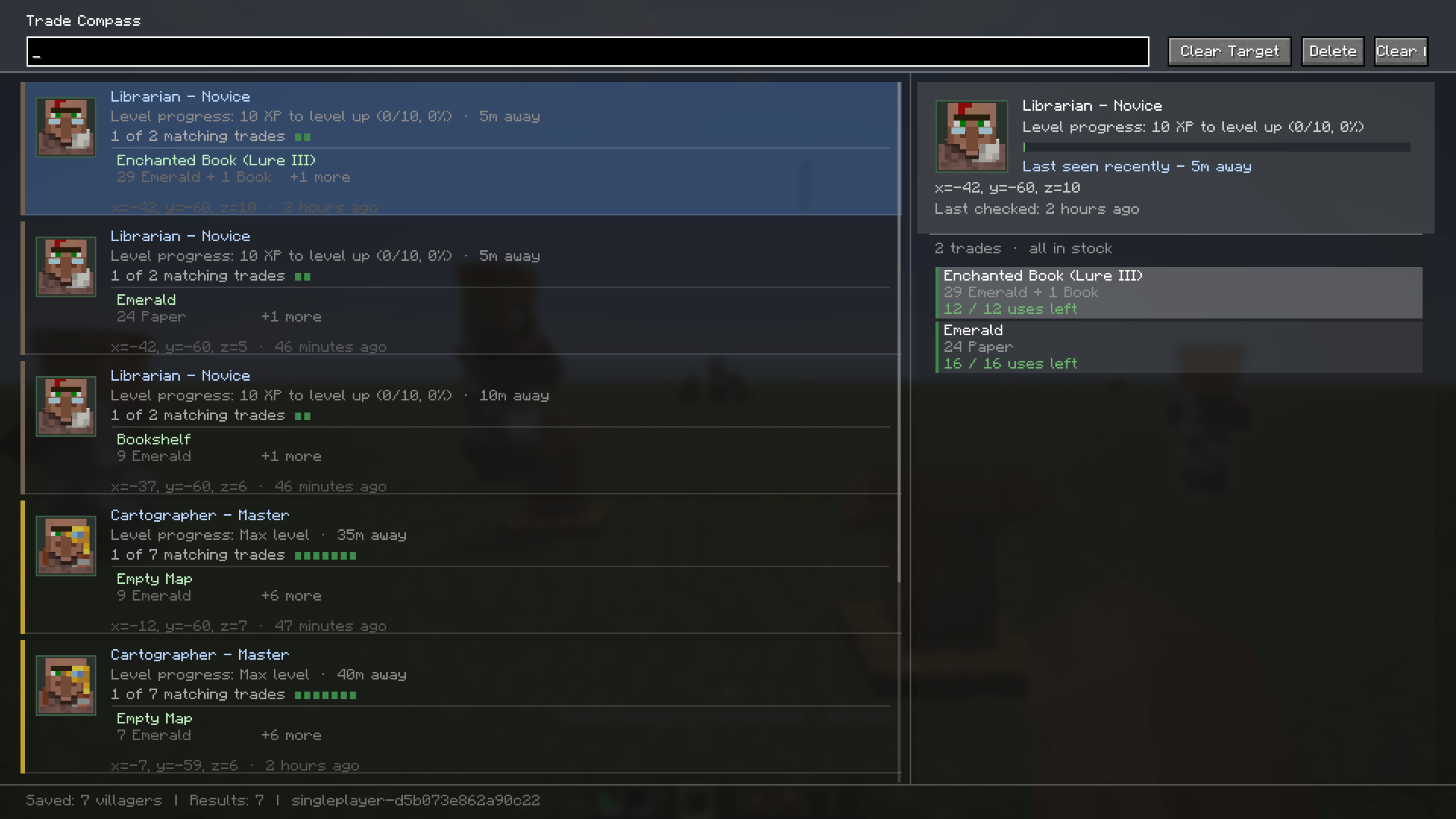
Find My Villager remembers trades after you open a villager or wandering trader trade screen. Later, press V to search through saved villagers by item, enchantment, profession, villager name, location, or saved trade details.
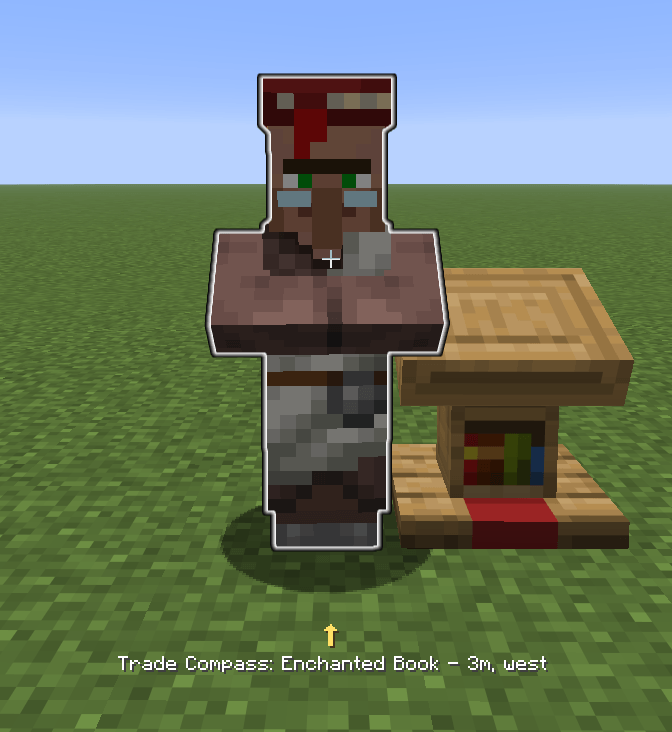
When you select a result, the mod points you back to that villager with a HUD compass and live distance readout. Once the villager is visible, they glow so you can find the correct one inside crowded trading halls.
No commands. No manual markers. No server install.
Just open villagers normally and the mod keeps track of them locally.
Need more details?
Read the FAQ for file names, privacy, multiplayer support, saved data, imports, backups, online sharing, and common questions.
Trading halls get messy fast.
You might remember that you had a Mending librarian somewhere, but not which villager it was. You might have dozens of farmers, armorers, clerics, librarians, or wandering traders saved across different worlds and servers.
Find My Villager is made for that exact problem.
The mod does not change how villagers work. You still discover trades normally by opening trade screens. The mod simply remembers what you have already seen and gives you a clean way to search it later.
Find My Villager includes a Data Manager screen for saved databases.
You can export your current world or server database as JSON, import another database, create backups, view database stats, reset the current database, and safely merge imported data.
This is useful if you switch launchers, move worlds, test multiple Minecraft versions, or just want a backup before changing anything.
Find My Villager is client-side only.
It does not automate trades, does not modify villager behavior, and does not require a server-side install.
For normal local use, saved data stays on your computer.
Saved data is currently stored locally in:
config/tradecompass/World and server databases are currently stored under:
config/tradecompass/worlds/The tradecompass folder name is kept for compatibility with older versions of the mod.
A future version may rename or migrate this folder to:
config/find-my-villager/If that happens, the migration will aim to preserve existing saved data safely.
Find My Villager includes an optional online sharing feature.
Online sharing is disabled by default. Incoming share invites are also disabled by default.
Normal villager searching, favorites, compass targeting, glow highlighting, imports, exports, backups, and local database management work without the online relay.
Read the full privacy notice here:
When online sharing is used, the mod connects to the official relay server:
https://findmyvillagershare.earlystream.workers.dev| Minecraft | Fabric | Forge | NeoForge |
|---|---|---|---|
| 1.21.1 | Yes | Yes | Yes |
| 1.21.4 | Yes | Yes | Yes |
| 1.21.8 | Yes | Yes | Yes |
| 1.21.11 | Yes | Yes | Yes |
| 26.1 | Yes | No | No |
| 26.1.1 | Yes | Yes | Yes |
| 26.1.2 | Yes | Yes | Yes |
| 26.1.x | Yes | No | No |
Build individual version folders with their Gradle wrapper, or use the root wrapper when the included builds are available.
| Loader | Source Folder |
|---|---|
| Fabric | versions/ |
| Forge | forgeversions/ |
| NeoForge | neoforge/ |
Built JARs are written to each version's:
build/libs/Find My Villager was originally called Trade Compass.
Because of that, some older JAR names, folders, config paths, or internal names may still use:
tradecompassThis is normal and does not affect the mod.
The old folder name is currently kept for compatibility. A future version may migrate the config folder to find-my-villager if it can be done safely without breaking saved databases.
Common questions are answered here:
Versions 0.4.0 and newer are licensed under the Earlystream Source-Available License v1.0.
This project is source-available for transparency, portfolio review, security review, compatibility review, and educational reading.
You may use official builds for personal gameplay. You may not reupload, redistribute, rename, publish modified builds, copy substantial source code, or create competing clones without written permission.
Older versions released under MPL-2.0 remain under MPL-2.0.
See:
LICENSEOfficial downloads are only allowed from this Modrinth page, the official CurseForge page, the linked GitHub repository, or other locations explicitly approved by earlystream.
Reuploads, renamed copies, modified builds, mirrors, unofficial ports, and third-party redistribution are not allowed without written permission.
Modpacks may include Find My Villager only through official Modrinth or CurseForge dependency/download systems. Do not manually rehost the JAR in a modpack archive, launcher CDN, Discord server, file host, or third-party mirror without written permission.