EnderPads are personal teleporters. They can be used for PvP raids, mining trips, creative minigames, lobby teleportation, and so much more.
Making one is simple:
Place a block of obsidian (configurable) where the center of your pad should be, then place a solid block on each cardinal (Northern, Eastern, Southern, and Western) side of the obsidian.
Whichever four blocks you chose to place become that EnderPads "link combo". Placing a pressure plate on top of the obsidian will complete the EnderPad, strike lightning and display your pad usage. Any EnderPads constructed with the same four blocks ("link combo") instantly become linked and allow long distance, inter-dimensional travel. If there are more than two linked EnderPads, teleportation between them will become random.
In a PvP setting, it should be obvious to note the importance of keeping your EnderPads hidden, as anyone could build a connecting EnderPad to your own. If "SkipBlockPads" is set to "true" in your configuration, placing a block above the pressure plate will prevent teleporting from and to the EnderPad. If "false", EnderPads could potentially be set up as traps. Espionage and combo stealing will become a regular part of your PvP experience. It's really fun.
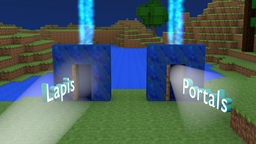
Above: Two linked EnderPads. The exact order of the blocks is not important, as long as they have the same blocks.
1.) Stop your server.
2.) Drag and drop the EnderPads.jar file into your plugin directory.
3.) Start your server.
4.) Configure the plugin to your liking using the generated configurations.
5.) Run the command '/enderpads reload' from the console or as a player with appropriate permission.
6.) Go build some portals!
Plugin preview by NhutThinhVN
Old pre-release video:
Free advertisement!
If you run a server using EnderPads, message me with your servers IP and/or website and I will list it here on the overview.
/enderpads | The base command | enderpads.command.enderpads
Valid subcommands are as follows:
/enderpads reload | reload the config and verify/cache all the EnderPads | enderpads.command.reload
  enderpads.*:
    description: Grants all plugin permission nodes
    default: OP
  enderpads.command.enderpads:
    description: Allows players to use /enderpads
    default: OP
  enderpads.command.reload:
    description: Allows players to use /enderpads reload
    default: OP
  enderpads.use:
    description: Allows players to use and construct EnderPads
    default: true
  enderpads.seeinfo:
    description: Allows players to see information of own EnderPads
    default: true
  enderpads.seeinfo.owner:
    description: Allows players to additionally see the EnderPads owner
    default: true
  enderpads.seeinfo.others:
    description: Allows players to see others EnderPads information
    default: true
  enderpads.alerts:
    description: Players will receive create and destroy alerts for EnderPads
    default: true
  enderpads.max.2:
    description: Allows players to construct a number of EnderPads
    default: true
  enderpads.max.*:
    description: Allows players to construct unlimited EnderPads
    default: OP
General:
  ColorfulLogging: true # toggles color codes in the console
  DebugMessages: false # enable if you like spam, or debugging things
  Version: 0.3.2-beta # indicates the version for this config. DO NOT CHANGE.
LogUse: true # log in the console when EnderPads are made, destroyed, or used.
Cooldown: 6 # the length in seconds you must wait between each EnderPad use.
SkipBlockedPads: true # if false, players could teleport into blocks and suffocate
DefaultMax: 6 # by default, if not using permissions, how many EnderPads players can build
CenterMaterial: OBSIDIAN~0 # the default center block for EnderPads. changing this will destroy all of your current EnderPads
Blacklist:
  Materials:
  - GRASS
  - DIRT<br />  # a list of block types you do not want to be used with EnderPads
  Worlds:
  - disabled_world_name
  - another_disabled_world<br />  # a list of world names where EnderPads are completely disabled
Effects:
  Lightning:
    OnCreate: true # strikes harmless lightning when an EnderPad is created
    OnDestroy: true # strikes harmless lightning when an EnderPad is destroyed
    OnUse: false # strikes harmless lightning when an EnderPad is used
EnderPads is now open source! Depending on your prowess, you can either contribute directly to the project, or use the plugin's methods and events in your own plugins.
More information will provided as I finish documenting the API.