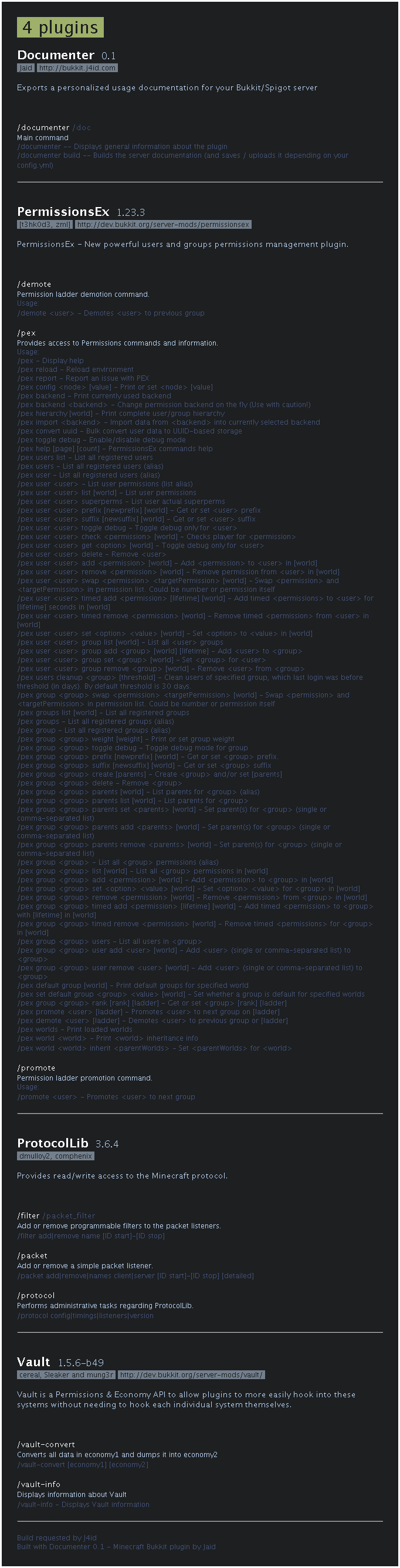
Documenter provides an alternative way of reading information about your plugins and their commands. It formats the command list (as found in /help) to a fancy command documentation that can be exported as .html, .png or directly uploaded to Imgur.
Installation
If you want to save the documentation as a file:
imgur_upload.enabled to false in Documenter/config.yml
html.enabled or image.enabled (or both) to true in Documenter/config.yml
/documenter config reload to reload your settings from config.yml
If you want to upload the documentation to Imgur:
imgur_upload.application_client_id in Documenter/config.yml with your application client ID
/documenter config reload to reload your settings from config.yml
Use command /documenter build and wait for output.
This will either save the documentation in the plugins/Documenter directory
or return an Imgur image link depending on your settings.
| Command | Alias | Permission | Usage |
|---|---|---|---|
| /documenter | /doc | documenter.command.info | Displays general information about the plugin |
| /documenter build | /doc build | documenter.command.build | Builds the server documentation (and saves / uploads it depending on your config.yml) |
| /documenter config reload | documenter.command.config.reload | Reloads configuration from config.yml |
Documenter is currently in an early stage of development regarding user-friendliness and stability.
Please report bugs, typos and any weird behaviour.
Documenter uses MCStats which sends some general server information
(including your Bukkit version, your Java version and your average player count)
to mcstats.org.
That information is strictly anonymous and publicly available.
Click here to see the Documenter statistics on MCStats.
If you want to disable this feature, include opt-out: true in plugins/PluginMetrics/config.yml.
Java 8 or above (you should be using Java 8 or above anyways)
Ingame chat after using /documenter build

Built with Documenter 0.1 on a server with PermissionsEx, Vault and ProtocolLib