Video tutorials · Config · Commands · Source · To do
With this plugin you can create a digital clock from any block material you want! The digital clock is in format HH:mm:ss, it's 5 block high and 26 blocks wide. You can show AM/PM, toggle showing seconds and much more!
Here is tutorial how to use this plugin in programming in your own plugin.
Please write about all issues here: github issues list. I will reply to them there. Or you can simply post a ticket :).
and much much more...

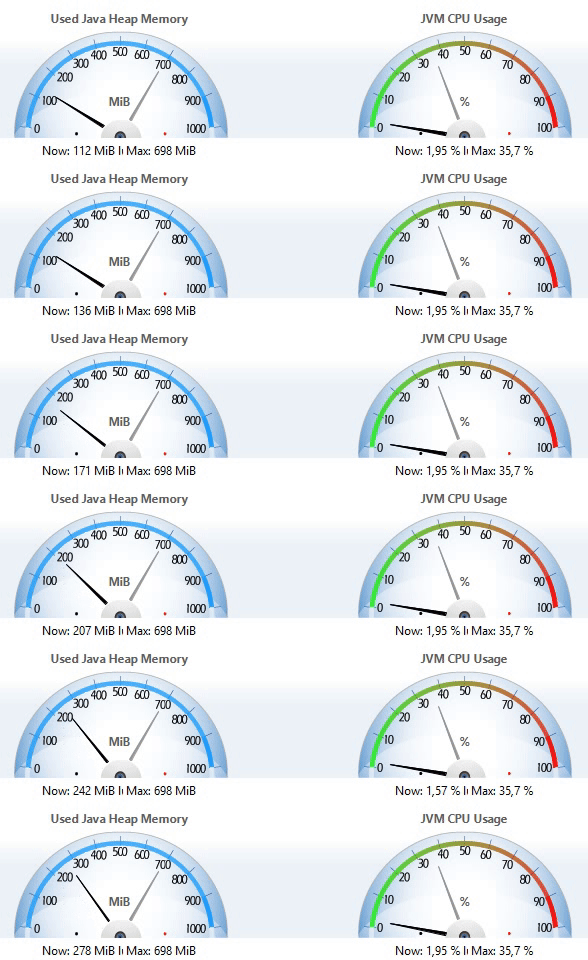
Information from Java Mission Control tool. Running 10 different clocks (plugin version 2.0, CB 1.8.8).
(PC specs: Intel(R) Core(TM) i5-4460 CPU @ 3.20 GHz + 12 GB RAM)

You can modify look of every number in config.yml. More about that is on the Config page (link).
If you are looking for video tutorails, go to the Video tutorials page (link).
If you update to newer version, it is recommended to backup previus DigitalClock folder from plugins folder and then delete it, the newer version may need to create new folder with changes. Maybe you will have to create all your clocks once again.
Can be found here.