This mod does not modify Pixelmon or its behavior.
@infidelrick on DiscordDialogue Utils is a server-side mod using the PixelmonAPI for generating dialogues, choice menus, input screens, and notice overlays in-game.
/dutil simple <player> <title> <message>Description: Display a simple dialogue box to the player.
Permissions Required: dialogueutil.simple
Example:
/dutil simple PlayerName "&eSafari Zone" &eGood Luck {player} &aCatch what you can before your timer runs out. Add more time with &e/safari buy #/dutil choice <player> <configId>Description: Send a choice menu to a player using a pre-configured dialogue in dialogues.yml. Choices can be configured to run commands, have pokedollar costs, and/or permission requirements.
Permissions Required: dialogueutil.choice
Example:
/dutil choice PlayerName shop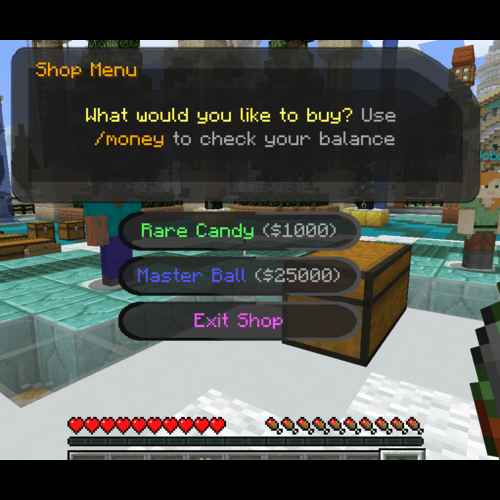
/dutil input player|console escape|stay <targetPlayer> <title> <message> <command>Description: Create an input dialogue for the target player, allowing them to input text.
Options:
player|console: Execute the command as the player or the consoleescape|stay: Determine whether the menu closes when "Escape" is pressedtitle & message: Put in quotes if more than 1 wordcommand: Can use {player} and {input} for placeholdersdialogueutil.input.player or dialogueutil.input.console/dutil input player escape Player123 "&9What's your favorite color?" "Please provide feedback:" msg {player} {input} is a good choice!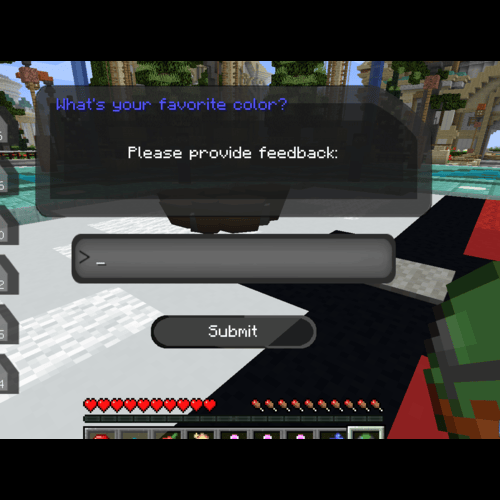
The notice system allows you to display overlays with various types of content.
/dnotice direct text <player> <duration> <lines>Description: Display a text-based notice overlay
Permissions Required: dialogueutil.notice.text
Example:
/dnotice direct text PlayerName 10 "&6Welcome!\n&eEnjoy your stay"/dnotice direct pokemon <player> <layout> <duration> <pokemon> <use3d> <lines>Description: Display a notice with a Pokémon sprite or 3D model
Permissions Required: dialogueutil.notice.pokemon
Example:
/dnotice direct pokemon PlayerName LEFT_AND_RIGHT 10 "pikachu growth:ginormous" true "&6Special Pikachu!\n&eCheck it out"/dnotice direct item <player> <layout> <duration> <lines> <itemWithNbt>Description: Display a notice with an item
Permissions Required: dialogueutil.notice.item
Example:
/dnotice direct item PlayerName LEFT_AND_RIGHT 10 "&6Master Ball\n&eUltimate catching power" "pixelmon:poke_ball{PokeBallID:\"master_ball\"}"/dnotice config <player> <configId>Description: Display a pre-configured notice from notices.yml
Permissions Required: dialogueutil.notice.config
Example:
/dnotice config PlayerName welcome/dnotice hide - Hide the current notice/dnotice list - List available notice configurations/dnotice reload - Reload notice configurations/dnotice help - Show notice command help/dutil reload - Reload dialogue configurations/dnotice reload - Reload notice configurationsconfig.ymlControls general settings and default messages.
# Enable/Disable Debug messages
debug: false
messages:
  noMoney:
    title: "§cNot Enough Money"
    message: "§cYou need {price} to select this option!"
  noPermission:
    title: "§cPermission Error"
message: "§cYou don't have permission: {permission}"dialogues.ymlDefine configurations for choice menus.
dialogues:
  shop:
    title: "&6Shop Menu"
    message: "&eWhat would you like to buy? &7Use &6/money &7to check your balance"
    choices:
      - text: "&aRare Candy &7($1000)"
        commands:
          - "[console]broadcast {player} got some candy"
          - "[console]give {player} pixelmon:rare_candy 1"
        price: 1000
        permission: "shop.rare_candy"
        failureTitle: "&cNo Permission"
failureMessage: "&cYou need the &6shop.rare_candy &cpermission!"notices.ymlConfigure different types of notices.
notices:
  welcome:
    type: text
    duration: 10
    lines:
      - "&6&lWelcome to the server!"
      - "&eThank you for joining us"
      - "&aEnjoy your stay"

  professor_pikachu:
    type: pokemon
    layout: LEFT_AND_RIGHT
    duration: 12
    pokemon: "pikachu growth:ginormous form:phd"
    use3d: true
    lines:
      - "&6&lBalance:"
      - "&e%vault_eco_balance%"

  master_ball:
    type: item
    layout: LEFT_AND_RIGHT
    duration: 8
    item: "pixelmon:poke_ball"
    nbt: "{PokeBallID:\"master_ball\"}"
    name: "&dMaster Ball"
    lines:
      - "&6&lMaster Ball"
- "&eThe ultimate Pokeball"dialogueutil.simple - Use simple dialoguesdialogueutil.choice - Use choice dialoguesdialogueutil.input.player - Use input dialogues as playerdialogueutil.input.console - Use input dialogues as consoledialogueutil.admin - Access administrative commandsdialogueutil.notice.text - Use text noticesdialogueutil.notice.pokemon - Use Pokémon noticesdialogueutil.notice.item - Use item noticesdialogueutil.notice.config - Use configured noticesdialogueutil.notice.admin - Access notice admin commands