Custom Interaction Sounds allows you to play your own custom sounds when you interact in Minecraft using the left and right click of your mouse. These sounds are played to everyone when both server and clients have the mod installed.
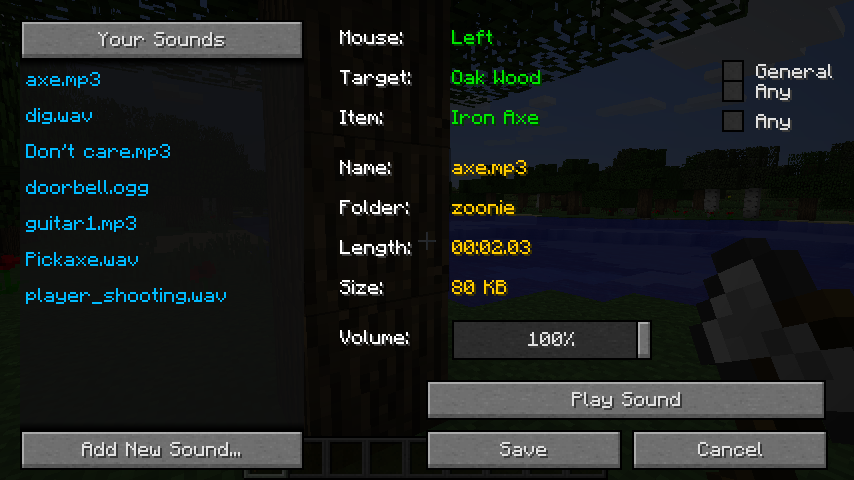
Holding the 'R' key while clicking brings up the menu to assign either an existing sound or a new sound from your file system to the current interaction.
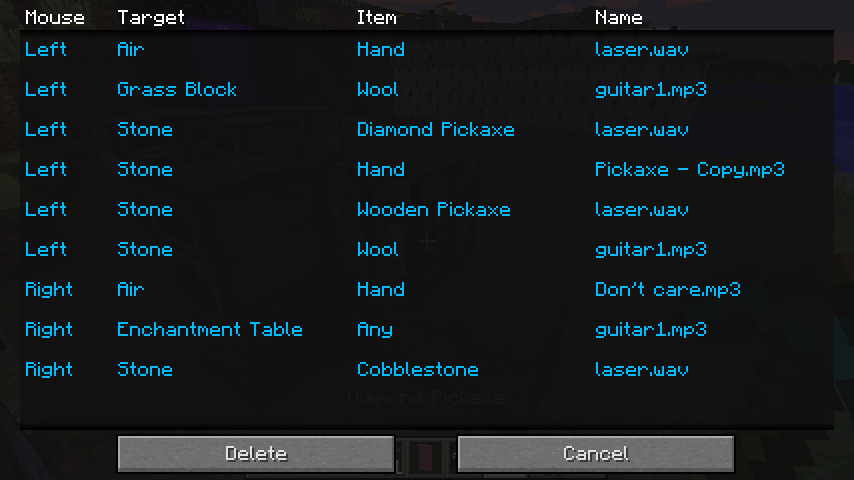
The 'L' key displays a list of your interactions and their assigned sounds.
The config file for the client has the option to mute the default sounds normally played when you left or right click a block and also has the option to mute the custom sounds of other players in multiplayer.
The config file for the server allows you to specify the length of sounds that can be played on the server. There is also the option to force all players to play the same sounds for the same interactions. This is done by merging the 'sounds' folder from a client into the 'sounds' folder of the server. The server will then be able to load the copied over mappings file and all the required sounds.
https://github.com/zoonie/CustomInteractionSounds