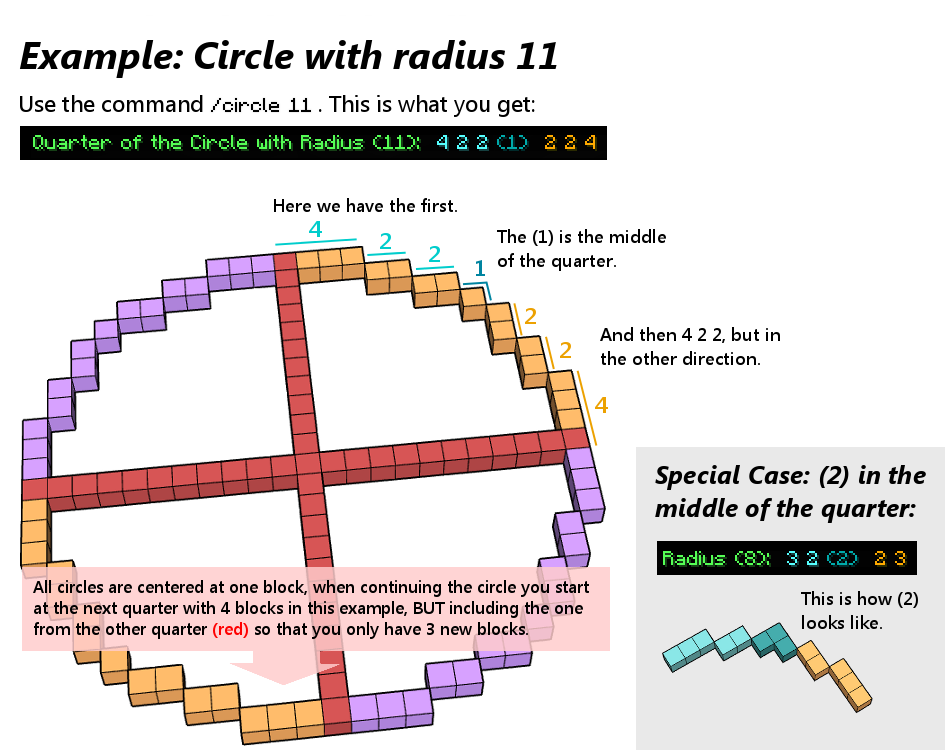
The Circleplugin provides you with the simple /circle <radius> command, which will give you a quarter of a circle in the serverchat. Note: It only gives you circles centered at one block!
It is pretty useful for building huge circles, which are hard to make without any plugins (like WorldEdit) or other circle calculators on the internet. The advantage of this plugin over internetcalculators is that you only have to type it in the serverchat and get a perfect circle (well you have to build it first of course) and that it gives you the block numbers you have to place, and not a picture of the finished circle (mostly reffering to this here). And its definetly useful for all servers that dont give WorldEdit to all players, because sooner or later a Minecraftplayer wants to make a circle.
Additionally since Circleplugin v1.3 you now have another command: /ellipse.
At the moment the only commands are:
/circle <radius> - Provides you with the blocks for a quarter of the circle with the selected radius.
/circle or /circle help - Provides you with the link to the Explanation Picture
/circle maxradius <new maxradius> - With this command you are able to change the max. radius the circles can have (advice: dont set it too high, because it will create lag around /circle 1000000)
/ellipse <xradius> <yradius> -Gives you one quarter of the ellipse with selected radii.
/ellipse -Gives you the link to the Explanation picture.
For all people, who are interested in such things: The algorithm for the circle calculation is based off "Bresenham's circle algorithm" or the Midpoint Circle Algorithm.
Thanks to Schmidtbochum for the awesome help pictures and the logo.
If you got any suggestions or find bugs/problems, just tell me and i will try to add/fix them.