This project is deprecated and will not be maintained or updated. Unless I feel like it. But I probably won't.
This is a Fabric mod that allows you to customize blocks' outline shapes/collision boxes. You can either specify another block to copy or create the shape yourself with cuboids.
How it works:
When you first start the game after the mod is installed, it will create a 'outlinepacks' folder in your run directory (the .minecraft folder usually). This is where you put outline packs.
An outline pack is just a folder containing a bunch of JSON files, one for each block that you want to change the outline for. The name of the outline pack doesn't matter; the name of each JSON file is the id of the block (e.g. brewing_stand.json or redstone_wire.json). Below are examples of how to fill out the JSON file (sorry about how the JSON looks, apparently CurseForge doesn't handle indentation well).
Copying another block:
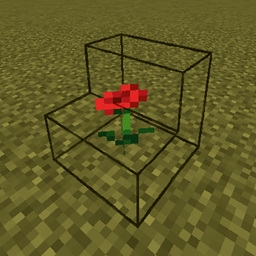
In poppy.json:
{
  "override": {
    "id": "minecraft:spruce_stairs",
    "blockstate": "facing=north,half=bottom,shape=straight"
  }
}
Result: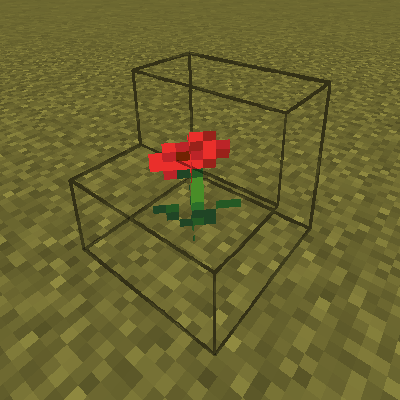
Note: if you want to copy a block that changes where it is depending on its position (flowers, bamboo, pointed dripstone, etc.), you should include a pos tag after the blockstate. So if you wanted to copy the outline of a dandelion at (24, 65, -121), the JSON would look like this:
{
  "override": {
    "id": "minecraft:dandelion",
    "pos": [24, 65, -121]
  }
}
(the blockstate tag is optional)
Creating your own shape:
In brewing_stand.json:
{
  "cubes": [
    [0, 0, 0, 8, 8, 8],
    [8, 8, 8, 16, 16, 16]
  ]
}
Result:

The format for each cube is [x1, y1, z1, x2, y2, z2]. (0, 0, 0) is the bottom north-west (-x, -z) corner of the block, (16, 16, 16) is the top south-east (+x, +z) corner. The cubes *can* go beyond the normal 16x16x16 block, but things can start to get wonky. You can combine as many of the cubes as you like, but too many will probably cause lag.
If you have both the "override" and "cubes" tags, it will use the override, not the cubes.
btw, the same packs need to be on the server and client if playing on a server. It won't crash or anything, it'll just be really glitchy and stuttery.
FABRIC API REQUIRED