A NeoForge 1.21.1 addon for FTB Chunks that adds a fully-featured chunk shop & marketplace to your server. Admins can set up server-wide claim pricing and shop districts, players can buy and sell their own claimed chunks, and everything is managed through an in-game GUI — no more memorizing commands.
/ftbshop gui) with a Marketplace, Sell Chunk screen, My Listings, and a Quickbuy toggle/ftbshop admin)B) to instantly buy the chunk you're standing in| Mod | Version |
|---|---|
| NeoForge | 21.1.224 |
| FTB Chunks (NeoForge) | 2101.1.14+ |
| FTB Teams (NeoForge) | 2101.1.9+ |
| FTB Library (NeoForge) | 2101.1.30+ |
| Architectury (NeoForge) | 13.0.8+ |
All dependencies must be installed on both the server and every client.
buyingchunks-1.2.0.jarmods/ folder of your server and all clientsBuying Chunks can automatically post a message to a Discord channel (or any custom endpoint) every time a chunk changes hands on the marketplace — handy for a public #shop-log channel so players can see activity without being online.
| Event | Fires when… | Embed color | Embed title |
|---|---|---|---|
| Purchase | a player buys a listed chunk (map, overlay, or Marketplace screen — any path) | green | ✅ Chunk Purchased |
| Listing | a player lists their own chunk via /ftbshop gui → Sell Chunk |
teal | 🧾 Chunk Listed for Sale |
| Removal | a player removes their own listing via My Listings → Remove | orange | 🗑️ Chunk Removed from Sale |
Note: this only fires for explicit player actions on the marketplace (buy / sell / remove). It does not fire when a server team auto-lists a chunk on claim (the Team Shop system) — only manual player listings and purchases are reported.
Each message is a single Discord embed with these fields:
[x, z]minecraft:overworld<count>x <item>The JSON is plain {"embeds":[{...}]} — standard Discord webhook format. Because it's just an HTTP POST to whatever URL you configure, it isn't actually limited to Discord: point apiUrl at your own bot/API endpoint and parse the same JSON yourself if you want custom handling instead.
This is the one part of the mod that isn't configured through /ftbshop admin — it lives in the server config file, not the in-game GUI:
config/buyingchunks-server.toml and set: [Webhook API]
apiEnabled = true
apiUrl = "https://discord.com/api/webhooks/XXXXXXXXXX/XXXXXXXXXXXXXXXXXXXXXXXXXXXXXXXXXXXXXXXXXXXXXXXXXXXXXXXXXXXXXXXX"Both values default to off / empty — nothing is sent anywhere unless an admin opts in.
WebhookSender: Failed to send to ...) — there's no retry and no in-game indication if delivery fails, so check your server log if messages stop showing up.Everything an admin needs — creating shop teams, setting prices, claiming chunks, configuring claim protections, all of it — is done through one single command:
/ftbshop admin(requires OP level 2 or higher). You should never need /ftbteams ... or /ftbchunks admin ... for day-to-day shop management anymore — the Admin Dashboard fully replaces them.
/ftbshop admin → Server Team Management → type a name (e.g. Shopping-District) into the Create New Server Team field → click Create./ftbshop admin → Team Prices → type the team name into the search field (an autocomplete dropdown shows matching teams) → select it → pick an item with the 🔍 picker (or type its ID) → set the amount → Add./ftbchunks admin open_claim_gui_as command did, just one click away. Claim the chunks you want to sell here.That's it — no other commands. Any chunk claimed by Shopping-District is now automatically listed for sale at the configured price.
By default, only admin-managed team shops are listed. To let regular players list their own claimed chunks:
/ftbshop admin → Player Sell → click Enable (the button flips to Disable once it's on)./ftbshop gui → Sell Chunk to list it.Buying Chunks supports three independent, stackable pricing mechanisms, all configured from /ftbshop admin:
| System | Where to set it | Applies to |
|---|---|---|
| Base Cost | Admin Dashboard → Base Cost | Every chunk claim on the server, regardless of team |
| Team Shop | Admin Dashboard → Team Prices | All chunks claimed by a specific (usually server-owned) team — auto-listed |
| Player Marketplace | The chunk's owner, via /ftbshop gui |
Any already-claimed chunk a player chooses to list, if Player Sell is enabled |
/ftbshop admin → Server Team Management lists every server team (color swatch + name) with, per row:
At the bottom: a name field + Create button for new server teams.
Clicking Manage opens the Team Detail screen — a full reimplementation of FTB Teams' own claim-settings panel right inside Buying Chunks, so you never have to open FTB Teams or FTB Chunks separately to configure a shop team:
A quick screen-by-screen breakdown of what's clickable where.
/ftbshop gui → Main Dashboard (4 rows)
| Row | What it shows | What it does |
|---|---|---|
| Marketplace | number of chunks currently for sale in your dimension | opens the Marketplace |
| Sell Chunk | the price if the chunk you're standing in is already listed, otherwise a prompt | opens Sell Chunk |
| My Listings | your active listing count + a preview of pending income, if any | opens My Listings |
| Quickbuy | Enabled / Disabled | toggles Quickbuy instantly (no screen change) |
Marketplace screen
Sell Chunk screen
My Listings screen
Buy confirmation screen (shown unless Quickbuy is on)
In-world Buy Overlay (toggle with the keybind, or it appears automatically near a listing)
/ftbshop admin → Admin Dashboard (7 rows, each with a live summary on the right)
| Row | Live summary shown |
|---|---|
| Base Cost | current cost, or "Not set" |
| Player Sell | Enabled/Disabled |
| Team Prices | number of teams configured |
| Buy Limits | number of teams with a limit |
| Player Income | number of teams with income disabled |
| Auto-Reclaim | number of teams enabled |
| Server Team Management | — |
Admin → Base Cost: item field + 🔍 picker, amount field, Set and Remove buttons, shows the currently active cost.
Admin → Player Sell: description text + a single Enable/Disable toggle button.
Admin → Team Prices / Buy Limits / Player Income / Auto-Reclaim: one shared screen layout — a scrollable list of currently configured teams (each with an ⌂ "open that team's claim map" button and a ✕ remove button), a team search field with a live autocomplete dropdown (powered by FTB Teams), an item picker + amount field (Team Prices/Buy Limits only), and an Add/Update (Team Prices/Buy Limits) or Toggle (Player Income/Auto-Reclaim) button.
Admin → Server Team Management / Team Detail: see the "Server Team Management" section above.
There are now three ways to buy a chunk:
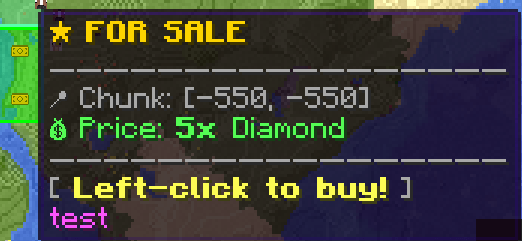
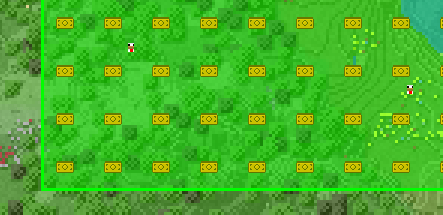
B) while standing in it.M), find a shop-colored chunk icon, hover for the price/tooltip, and left-click to buy./ftbshop gui → Marketplace to search, sort (price or distance), favorite, and buy listings from anywhere.Make sure you have the required items in your inventory! If Quickbuy is enabled (toggle it in /ftbshop gui), purchases skip the confirmation screen entirely.
You can't buy your own chunk or a chunk owned by your own team, and you can't buy at all while your character is part of a server team. The chunk is transferred to your team immediately upon purchase, and nearby players will see a purchase effect.
If an admin has enabled Player Sell:
/ftbshop gui → Sell Chunk.| Command | Description | Permission |
|---|---|---|
/ftbshop gui |
Open the shop dashboard (Marketplace, Sell, My Listings, Quickbuy) | Everyone |
/ftbshop admin |
Open the admin dashboard — every admin action lives here (Base Cost, Team Prices, Player Sell, Buy Limits, Player Income, Auto-Reclaim, Server Team Management incl. team creation/deletion, claim protections, and jumping into a team's chunk map) | OP 2+ |
All configuration that used to require typed
/claimshop ...commands (set, remove, info, teamprice, playersell, playerincome, basecost, autoreclaim, setting) — and even team-management tasks that used to require/ftbteams server createor/ftbchunks admin open_claim_gui_as— has moved into the/ftbshop adminGUI. In practice,/ftbshop adminis the only command you'll ever need to type.
Two config files are generated under config/:
welcomeEnabled / welcomeMessage — first-join welcome message (supports § color codes).apiEnabled / apiUrl — enable and set a Discord-style webhook URL to receive chunk purchase/listing/removal events as embeds.The mod supports full translation. It can be translated even more here: https://crowdin.com/project/buying-chunks
SavedData system — it persists across restarts.0 — only the active listing count is accurate.MIT License ©snoopypupser