Loading...
Beta Modpages Unclaimed

Astikor Carts TFC

A fork of Issork and Pau101's Astikor Carts mod that aims to add compatibility with TerraFirmaCraft.

0 Likes
202496 Downloads
Created by Verph

Description

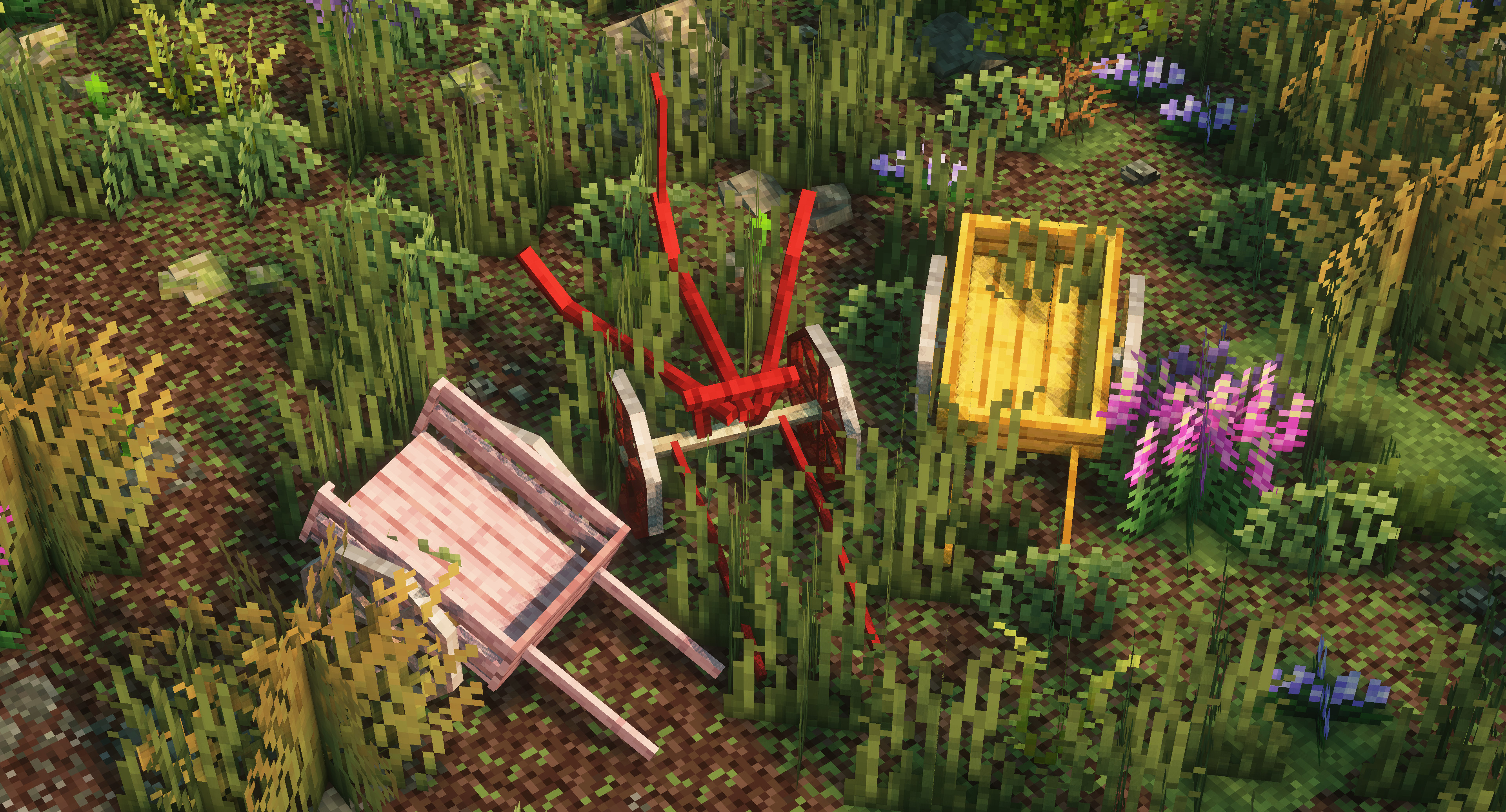
It works similarly to the main Astikor Carts mod, but adds new carts for each wood type. This compatibility mod also adds new mechanics to the plow cart, which can now be used to "mow" large quantities of shrubberies, loose rocks and more. This change also makes it possible to efficiently till soil blocks to farmland where there are a lot of plants.

General Config

These settings define how carts interact with animals, items, and players. They control what can be carried and how pulling speed is affected by nutrition, thirst, hunger, and cargo weight.

Animal Cart Settings

  • maxAnimalSize
    The maximum size (in blocks volume) of an animal that can be loaded into the animal cart. Larger animals above this threshold cannot be carried.
    Default: 3.0

  • maxPassengerCount
    The maximum number of animals the cart can carry simultaneously.
    Default: 2

  • canPushIntoPlayers
    If enabled, the animal cart can pick up players by being pushed into them.
    Default: true

  • canCarryWaterEntities
    If enabled, aquatic creatures (fish, dolphins, whales, etc.) can be picked up by the animal cart.
    Default: true

Supply Cart Settings

  • maxItemSize
    The largest item size (inclusive) that can be stored in a supply cart.
    Allowed values: TINY, VERY_SMALL, SMALL, NORMAL, LARGE, VERY_LARGE, HUGE
    Default: VERY_LARGE

Pulling Behavior

  • pullingDistanceModifier
    Adjusts the tolerance for how far a cart can be pulled before the connection breaks. Higher values allow greater pulling distance/threshold.
    Default: 2.0

  • toggleFoodSpeed
    Determines whether the player’s nutrition, thirst, and hunger affect cart pulling speed.

    • When enabled, pulling speed is scaled by the player’s average nutrition × thirst × hunger.
    • The formula produces a health factor that modifies speed between 25% (minimum) and 100% (maximum).
    • Example: A well-fed, hydrated player pulls carts faster; a starving, thirsty player pulls slower.
      Default: true

Cart Inventory Config

These settings control how carts behave in terms of cargo weight limits and inventory size. They let you fine‑tune the balance between realism and convenience.

Weight Thresholds

How Weight Thresholds Interact

The logic:

  • Exhausted Threshold: If cargo weight exceeds this value, the player gains the Exhausted effect.
  • Overburdened Threshold: If cargo weight exceeds this higher value, the player gains the Overburdened effect.
  • Pinned Threshold: If cargo weight exceeds this maximum, the player becomes Pinned and immobilized.

The thresholds act as progressive stages of fatigue based on the estimated cargo mass.

  • exhaustedThreshold
    The mass (in kilograms) at which a player pulling a cart becomes exhausted. At this point, movement slows down significantly.
    Default: 400 kg

  • overburdenedThreshold
    The mass at which the player becomes overburdened. Movement is heavily restricted, but not yet immobilized.
    Default: 1000 kg

  • pinnedThreshold
    The mass at which the player becomes pinned and unable to move at all.
    Default: 2000 kg

Example: A VERY_HEAVY HUGE item might weigh ~280 kg. With a pinned threshold of 800 kg, carrying three such items would immobilize the cart puller.

Inventory Sizes

  • Hand Cart Inventory

    • Rows: handCartInventoryHeight (Default: 2)
    • Columns: handCartInventoryWidth (Default: 5)
      -> This defines a 2×5 grid (10 slots) for the hand cart.
  • Supply Cart Inventory

    • Rows: supplyCartInventoryHeight (Default: 5)
    • Columns: supplyCartInventoryWidth (Default: 9)
      -> This defines a 5×9 grid (45 slots) for the supply cart.

As of version 1.2

Relevant mostly for mod and modpack makers:

  • Automatic item and entity registration of any wood types from enum classes that implements TFC's RegistryWood interface! (e.g.: supports mods like ArborFirmaCraft)
  • You only need to supply the relevant datapack files (recipes, tags, tfc data, etc.) and assets (textures, item models, lang, etc.)!


AD Become Premium to remove Ads!

What means Verified?

  • Compatibility: The mod should be compatible with the latest version of Minecraft and be clearly labeled with its supported versions.
  • Functionality: The mod should work as advertised and not cause any game-breaking bugs or crashes.
  • Security: The mod should not contain any malicious code or attempts to steal personal information.
  • Performance: The mod should not cause a significant decrease in the game's performance, such as by causing lag or reducing frame rates.
  • Originality: The mod should be original and not a copy of someone else's work.
  • Up-to-date: The mod should be regularly updated to fix bugs, improve performance, and maintain compatibility with the latest version of Minecraft.
  • Support: The mod should have an active developer who provides support and troubleshooting assistance to users.
  • License: The mod should be released under a clear and open source license that allows others to use, modify, and redistribute the code.
  • Documentation: The mod should come with clear and detailed documentation on how to install and use it.

AD Become Premium to remove Ads!

How to Install

1

Download Forge & Java

Download Forge from the offical Site or here. If you dont have Java installed then install it now from here. After Downloading Forge you can run the file with Java.

2

Prepare

Lounch Minecraft and select your Forge istallation as Version this will create a Folder called Mods.

3

Add Mods

Type Win+R and type %appdata% and open the .minecraft Folder. There will you find your Folder called Mods. Place all Mods you want to play in this Folder

4

Enjoy

You are now Ready. Re-start your Game and start Playing.

More Mods like this

Mouse Tweaks

Enhances inventory management by adding various functions to the mouse buttons.

Bookshelf

An open source library for other mods!

Comforts (Fabric/Forge/Quilt)

Adds sleeping bags and hammocks for, respectively, portability and turning day to night, without setting new spawns. Comes in 16 different colors!

BetterFps

Performance Improvements

Supplementaries

Vanilla+ additions: Jars, signposts, faucets, weather vanes spring launchers, sconces, planters, lights, decoration and automation

RandomPatches (Forge)

A bunch of miscellaneous patches for Minecraft, including configurable connection timeouts, player speed limits and other bug fixes and improvements.

FancyMenu

Customize Minecraft's menus with ease!

Phosphor (Forge)

Performance improvements for Minecraft's lighting engine

Snad

Finally, sand that actually makes sugarcane grow faster.